View and Track Recurring Gifts in your Dashboard
Last updated: September 9, 2026
Recurring donations are one of the most desired types of giving because they represent consistent, reliable income for your organization. Now, you can easily track who is giving on a regular basis and when their next gift will be in the Recurring Gifts section of your Overflow Dashboard.
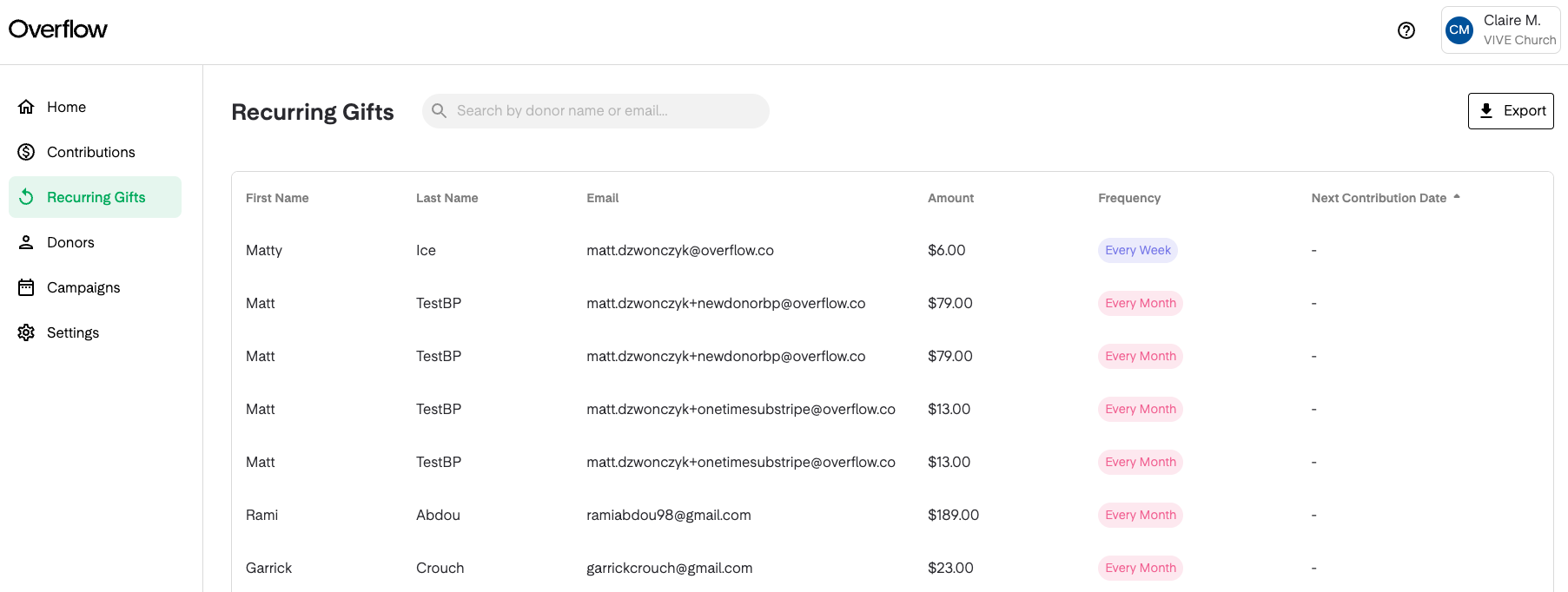
Overview
The Recurring Gifts section shows you the following information:
- Donor first name, last name, and email address
- The value of the recurring gift
- The frequency of the gift. Different colors represent different recurrence frequencies which include Every Week, Every Two Weeks, and Every Month.
- When the recurring gift will next occur. The list is defaulted to show the next soonest recurring gift at the top. You can click the column header 'Next Contribution Date' to switch the display order.
Take Action
To export a list of all recurring transactions, click the Export button on the top right of your screen.
To view all of the completed donations associated with a recurring gift subscription, click anywhere on the recurring gift item. This will take you into a filtered view of the Contributions table.
FAQs
My donor set up a recurring gift on the 1st and 15th of every month. Why am I not seeing that option within the Frequency column?
Does the Recurring Gifts section show recurring stock and crypto donations?
The Recurring Gifts table currently only displays recurring cash, debit, and ACH donations.