Pulling Reports for First-Time Donors
Last updated: October 21, 2026
Need to identify or report on your organization's first-time donors? Here are 3 ways to get that view, depending on what you're looking for.
Homepage
For a quick overview, we recommend checking the New Donors section on your homepage. This surfaces both one-time and recurring first-time donors automatically, no filtering needed.

⏩ Recurring Donors: If a donor recently set up a recurring gift, you might notice a future date listed. This happens when the donation is scheduled to begin on a later date, rather than starting immediately.
Contributions Table
Want a custom report you can export and analyze? The Contributions table lets you build this in a few steps:
Filter the Contributions table by your desired custom date range (e.g., year to date).
Export the filtered gift rows. 📤
In the exported file, sort gifts chronologically by Date. This is the date the gift was initiated.
Use Donor ID to group gifts and identify donors who gave during the selected period. A donor in this export is not necessarily a first-time donor: compare that donor's complete giving history with gifts before the reporting period, and classify the donor as first-time only when no earlier gift appears in the available history.
This approach is a great option when you want to define your own reporting period. It's especially useful if you're building a weekly, monthly, or quarterly report, since you can adjust the date range each time. The export shows gifts made during that period, but it cannot verify first-time status by itself. If earlier giving records are unavailable, check the donor's profile history or contact support before classifying the donor as a first-time giver. Keep the donor's profile creation time, gift date, and first-ever gift date separate.
People Module
Prefer to work from Donor Profiles directly? You can filter the People module by the New stage. 🔵
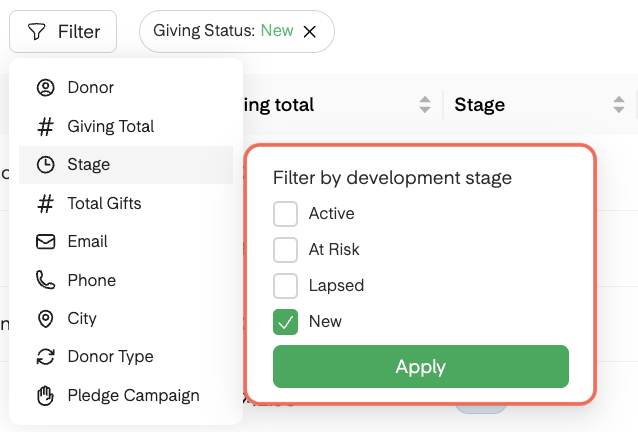
Stage = New is a current, recent view—not a date-bounded historical first-time-donor report. It reflects giving in the last 30 days with no prior giving history, or a newly created donor profile.
For a specific historical timeframe, use the Contributions table and compare each donor's complete giving history with gifts before the selected period. The People module is better suited for reviewing current donor stages and giving totals than for historical date filtering.
Donors whose only activity is anonymous gifts, failed gifts, or no giving history yet won't have a stage populated on their profile.
Recent First-Time Donors
Need a first-time donor report for a shorter window, like the last 7 or 14 days? You can build one by exporting from the People module and refining the results in a spreadsheet:
Navigate to the People module.
Filter donors by Stage = New and Total Gifts = 1. ℹ This is a recent current-stage view, not a historical date-range verification.

If you'd like to narrow further, use the Donor Type filter. (Select One-Time to isolate first-time gifts, or Recurring to isolate new recurring gift setups.)
Once your filters are applied, export the results. 📤
Use the gift timestamp in the exported file to narrow the results to your chosen reporting window. Do not use profile creation time as a substitute for the gift date or the donor's first-ever gift date.
We recommend copying the relevant rows into a pivot table or new spreadsheet to create a clean, shareable report for your team.